
Completing Tasks
To mark a task as Complete click on the Ellipsis Icon (3 vertical dots shown on the right).
Click on the Edit Icon.
Select the status to Complete.
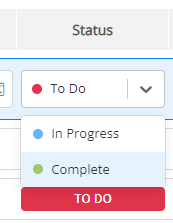
Click on the Tick to Save or the Cross to exit without Saving.
Using Gold-Vision
To mark a task as Complete click on the Ellipsis Icon (3 vertical dots shown on the right).
Click on the Edit Icon.
Select the status to Complete.
Click on the Tick to Save or the Cross to exit without Saving.
 Related articles