
Storage Feature Improvements
Based on your feedback we are designing features to help you manage your document, email, and email attachments storage.
There will be a new option for your System Admin users in Settings where you can find your Storage allowances and usage:
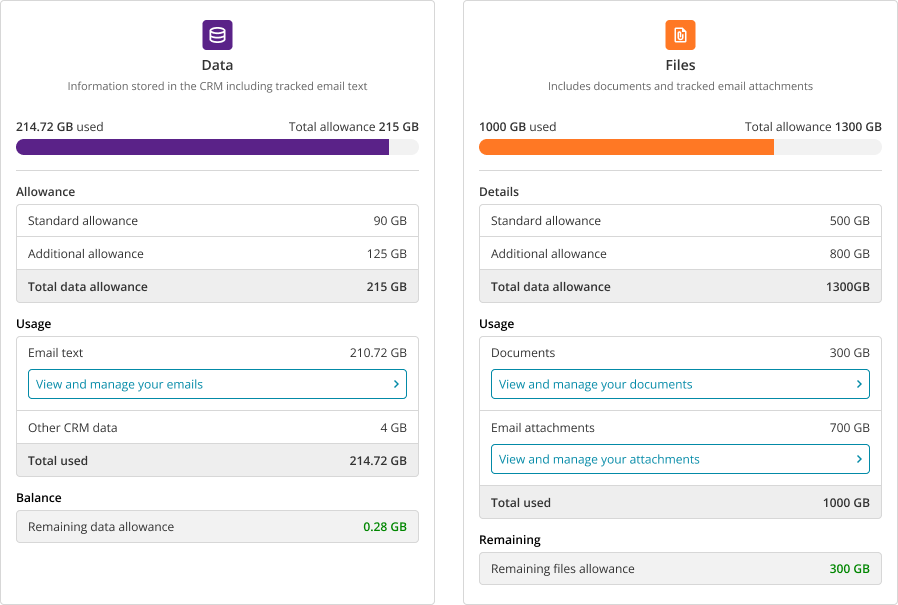
A delete option will then be available for your Search Email and Search Attachments list so that you can delete older email and attachments that you no longer need, freeing up your storage space.

Mail Tracking Settings will also have a new checkbox called ‘exclude files embedded in emails’. When used, your mail tracking will only save actual attachments to the emails, and not files, such as photos or header images that are embedded in the emails themselves.
We are also investigating the technical feasibility of using SharePoint for storage of your attachments.
Let us know what you think – will these Storage improvements make managing your storage costs easier? Or are there other ideas that you may have? Be sure to visit the portal and vote for this item if you’d like us to prioritise it with the Product Team. Each vote counts, so if you feel it would significantly help your business, ask your colleagues to vote too!